Information on Merchant Accounts,
Ecommerce and Credit Card Processing

April 21st, 2026 by J B

Merchant Account Pricing Models Explained: Tiered, Flat Rate, and Interchange-Plus

Filed in: Merchant Accounts | Add comment

When you sign up for a merchant account, one of the most important decisions you will make is how you agree to be charged for processing. Most business owners spend more time picking their terminal than understanding their pricing model, and that is a mistake that can quietly cost real money over time.

There are three main pricing models used by processors today: tiered pricing, flat-rate pricing, and interchange-plus. Each works differently, and each has tradeoffs worth understanding before you sign anything.

How tiered pricing works

Tiered pricing was the industry standard for decades and is still widely used. Under this model, every transaction is sorted into pricing tiers — commonly three, but some processors use two, four, or more depending on how their plans are structured. The most common setup has a qualified tier, a mid-qualified tier, and a non-qualified tier. Qualified transactions get the best rate. Mid- and non-qualified transactions get hit with a surcharge on top of the base rate.

The problem is that the processor decides which transactions land in which tier, and the criteria are rarely explained clearly. Rewards cards, corporate cards, keyed-in transactions, and others routinely fall into the higher tiers. It is not unusual for 30% or more of a business’s transactions to downgrade, which can significantly inflate what looks like a competitive base rate.

When a processor quotes you “1.69% qualified,” that number only tells part of the story. The mid-qualified surcharge might add another 0.75%, and the non-qualified surcharge another 1.50% or more on top of that. Your actual effective rate can end up well above what you thought you were signing up for, and it is genuinely difficult to audit your statement to figure out where the money went.

How flat-rate pricing works

Flat-rate pricing is simple by design. You pay one rate on every transaction regardless of card type, how it was entered, or any other variable. Payment aggregators like Square and Stripe built their businesses on this model.

It is worth noting that Square actually charges different rates depending on how a card is accepted — in-person tap or chip transactions, keyed-in transactions, and online transactions each have their own rate. That is technically a form of tiered pricing. The reason it still feels like flat-rate is that merchants control how they accept cards. If you never key in a sale, you always pay the same in-person rate. The tiers exist, but a disciplined merchant can stay in the lowest one consistently.

Square currently charges 2.6% + $0.15 for in-person transactions. Stripe is at 2.9% + $0.30 for online payments. The simplicity is real, and for very small businesses or those just getting started, it has genuine value. You always know roughly what you will pay.

The tradeoff is that flat-rate pricing is a one-size-fits-all solution. The rate has to be set high enough to cover every card type, including the expensive rewards and corporate cards that cost more to process. Businesses with a good card mix — mostly basic consumer cards processed in person — end up subsidizing the cost of everyone else. As volume grows, that premium adds up. Most businesses processing more than $10,000 to $15,000 per month are likely overpaying compared to what a properly structured merchant account would cost them.

How interchange-plus pricing works

Interchange-plus pricing separates two things that other models bundle together: the wholesale cost of the transaction and the processor’s markup.

The wholesale cost is interchange. It is set by Visa, Mastercard, Discover, and American Express, and it is the same for every processor. Nobody negotiates it. A basic consumer card swiped in person sits in a different interchange category than a premium rewards card or a corporate card, and those differences show up clearly on your statement. These rates are published publicly and change twice a year, in April and October. In general, in-person consumer card transactions run lower than key-entered or online transactions, which carry more fraud risk and are priced accordingly by the card networks.

The plus in interchange-plus is your processor’s markup. This is the part that is actually negotiable, and it is the same on every transaction regardless of card type.

What this means in practice is full transparency. Your statement shows exactly what went to the card networks and exactly what went to your processor. You can verify both. You can compare processors on an equal footing because the markup is isolated and visible.

Which model is right for your business

Flat-rate pricing makes sense if you are very early stage, processing low volume, or value simplicity above all else. There is nothing wrong with starting there.

Tiered pricing is hard to recommend in most situations. The lack of transparency makes it difficult to know what you are actually paying or whether you are getting a fair deal. If you are on a tiered plan and want to understand your true effective rate, ask your processor to break down what percentage of your transactions are hitting each tier. If they cannot or will not tell you, that is worth paying attention to.

Interchange-plus is what we recommend for most businesses that are past the startup phase. Whether it is the cheapest option for any given merchant depends on the markup a processor offers, and that varies. What it does guarantee is that you can see exactly what you are paying and why. When rates change, you see it. When your card mix shifts, you understand how it affects your costs. That kind of visibility makes it easier to manage your processing over time and to have an informed conversation with your processor when something does not look right.

The bottom line

Pricing models are not just a technical detail buried in your merchant agreement. They determine how clearly you can see what you are paying and how much control you have over those costs. If your current processor cannot give you a plain explanation of how your transactions are being priced, that is worth addressing. We are happy to walk through your current statement and show you exactly where your processing dollars are going.

Note for review: approximately 920 words. Changes made: tiered section now notes variable number of tiers; flat-rate section explains Square’s structure and why it still functions like flat-rate for disciplined merchants; interchange-plus closing reframed around transparency and visibility rather than cost comparison; specific rate figures softened to general ranges to avoid accuracy risk.

February 18th, 2026 by J B

Choosing a Payment Terminal in 2026

Filed in: Merchant Accounts | Add comment

When it’s time to choose payment equipment for your business, you’ll face dozens of options with varying features and price points. If you are looking for the best payment terminal for standard card payments, then don’t overthink it. If you are already working with a processor or an agent, ask them what devices they have the best support for. While the devices all do the same thing, the way they go about them can be different, and choosing a device that your support teams already know how to operate will serve you more than almost any particular terminal spec.

If you are shopping for a processor or just want to dig deeper into payment devices, here are our thoughts.

Start With Your Business Reality

Before looking at specific terminals, ask yourself these questions: Where do you process payments? Are you stationary behind a counter, moving around your store, or taking payments in the field? Do you need to print receipts immediately, or can customers receive digital receipts? How many transactions do you process daily?

These answers matter more than any specific feature list. A food truck has different needs than a retail store, and a mobile repair service has different needs than a restaurant.

What Features Actually Matter

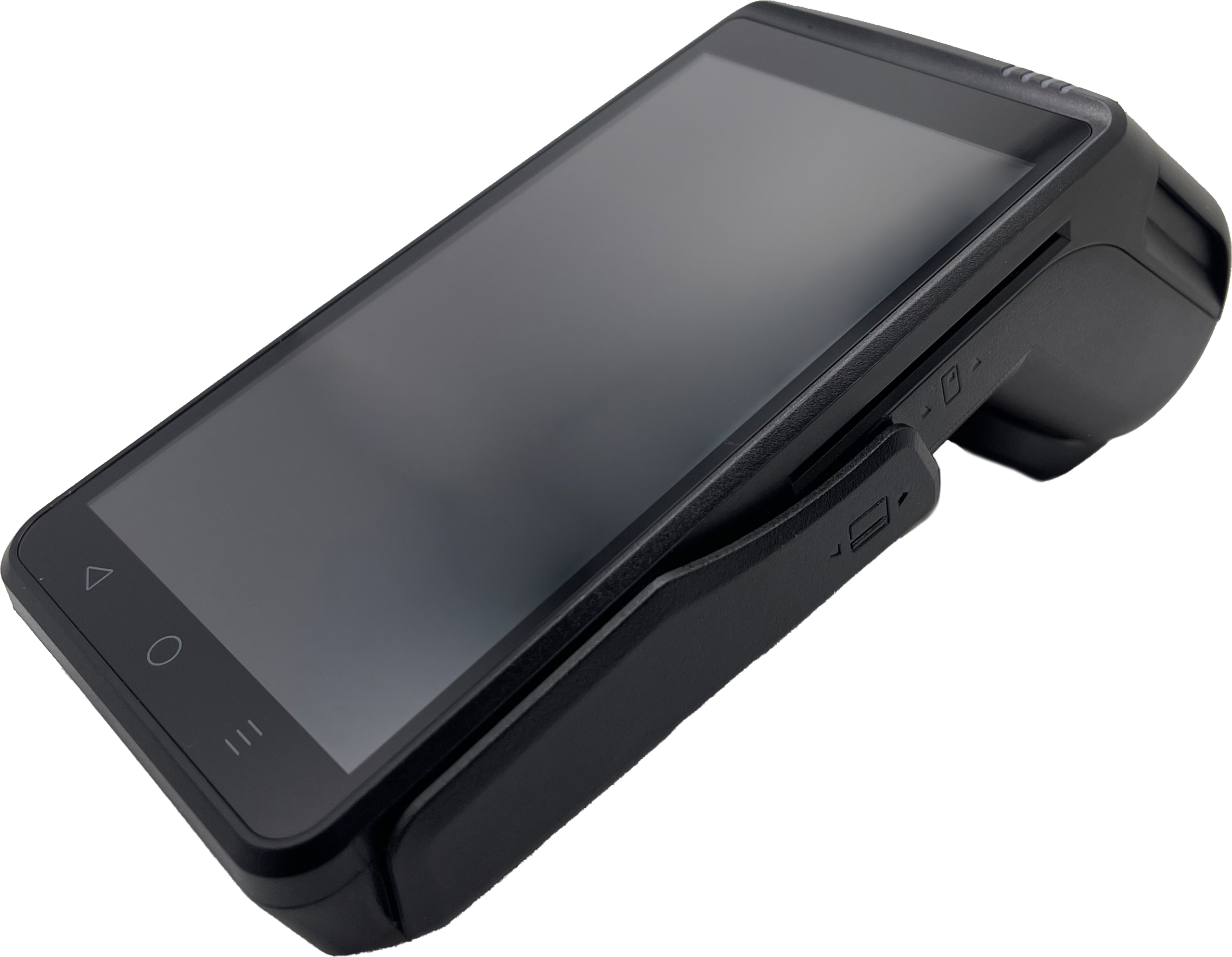
Connectivity Options: Modern terminals offer WiFi, Ethernet, and some also offer cellular connectivity. Countertop businesses typically use Ethernet or WiFi for reliability and speed. Mobile businesses need cellular capability to process anywhere. Some terminals like the Dejavoo QD2 offer both WiFi and 4G, giving you flexibility as your business needs change.

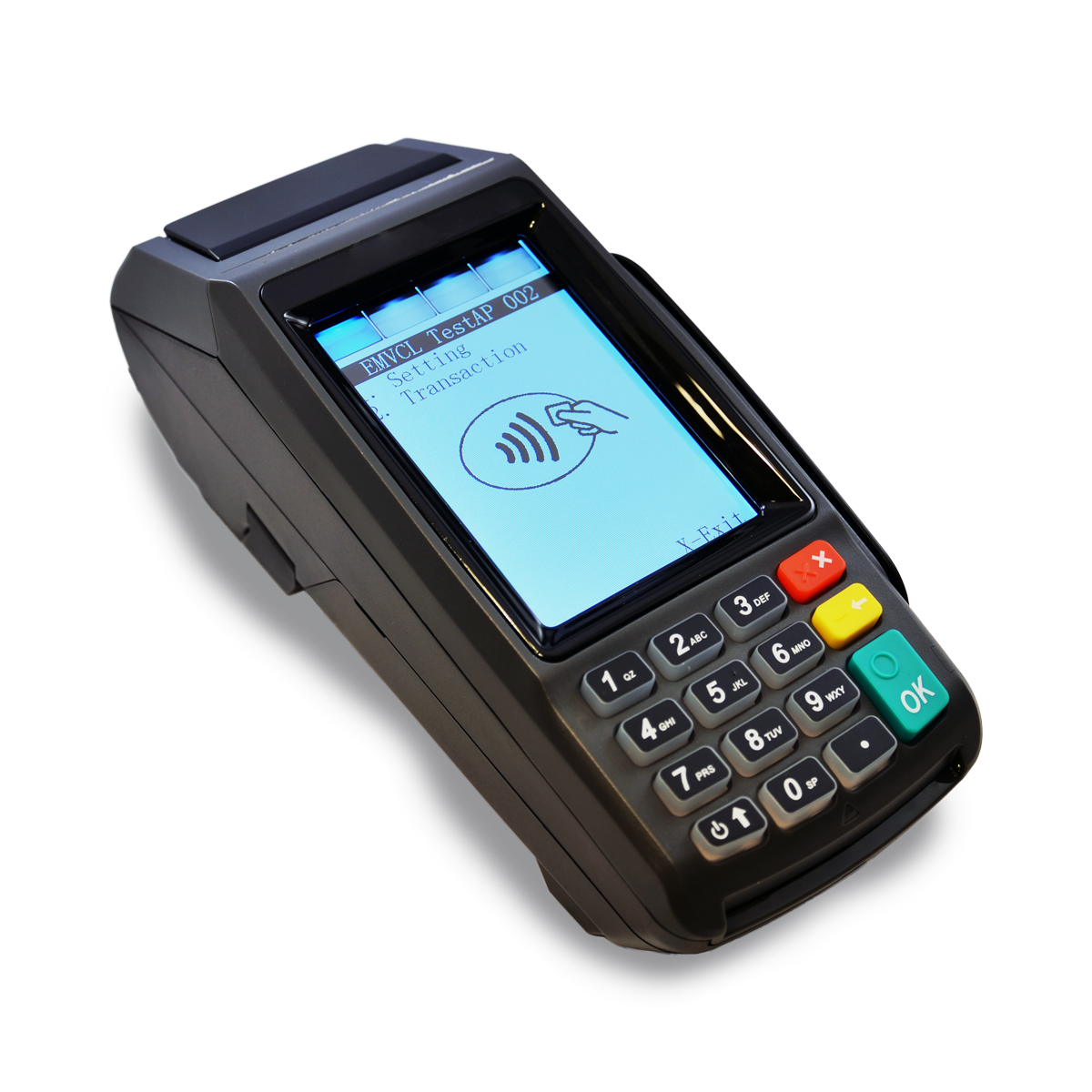
Screen Size and Type: Touchscreens make navigation faster for both staff and customers. Larger screens (4-5 inches) reduce errors and speed up checkout, particularly for businesses that process many transactions. That said, if you are in a busy environment you may benefit from a tactile keyboard. The Dejavoo P1 features a 5-inch HD touchscreen that makes it easy to navigate menus and display information clearly to customers but also offers a full keyboard. It’s slightly larger than its QD cousin but offers the best of both worlds when it comes to user inputs.

Processing Speed: The terminal determines how quickly transactions complete. Faster processors mean shorter wait times at checkout. This matters most for high-volume businesses like quick-service restaurants or convenience stores where seconds add up.

Built-in Printer vs. No Printer: Terminals with built-in printers can cost more and are bulkier but provide immediate paper receipts. Compact terminals without printers work well for mobile businesses or when digital receipts are sufficient. If size is not the main factor, we would recommend getting a device with a built-in printer, even if you don’t plan on using it today. If things change, it’s better to have it than not.

Battery Life (for mobile units): If you’re mobile, then you might be concerned about battery life. Battery-powered credit card terminals are generally designed to last all day on a charge. Many can even be powered over USB-C, so adding a power bank can easily extend a device’s power-on time. Most credit card terminals that have batteries make them easy to replace, so you could swap between batteries if you needed. Also, over time as battery life depletes you simply get a new battery and swap it out.

Understanding Terminal Categories

Countertop Terminals: These stay in one place and typically connect via Ethernet or WiFi. They often include larger screens and faster processors. The Dejavoo P1 and QD4 are solid countertop options with touchscreens and built-in printers for businesses that process payments at a fixed location.

Mobile/Wireless Terminals: These work anywhere within WiFi range or with cellular connectivity. Smaller and battery-powered, they’re ideal for tableside restaurant service, outdoor businesses, or mobile service providers. The Dejavoo P3 and QD2 offer wireless connectivity with full payment processing capability. Just keep in mind that cellular devices will require a cellular plan which will have additional monthly costs.

Compact Mobile Terminals: Ultra-portable devices without built-in printers. Perfect for businesses where receipts aren’t critical or can be sent digitally.

Android vs. Linux: Does It Matter?

The real difference between the two is the underlying functions of the device. Android devices are going to tend to be more like smartphones. That is going to make connecting to WiFi an easier task. Linux-based devices are going to seem more like traditional payment terminals where even the most basic hardware settings are buried in some menu system that doesn’t resemble anything you interact with in your regular life. That said, purpose-built devices tend to be a little more robust depending on brand.

What Doesn’t Matter As Much As You Think

Brand Name Recognition: Lesser-known brands often offer the same functionality as big names at better prices. In fact, in many ways they offer better devices and software since their teams are more closely integrated.

Tons of Extra Features: Many terminals include features most businesses never use. A barcode scanner or biometric fingerprint reader might sound impressive but adds cost and complexity if you don’t need them.

The Absolute Latest Model: Unlike smartphones, the latest models don’t tend to have fun new features. Most basic terminals are built to last for years and years. The Dejavoo Z Series of terminals has been around for what has to be the better part of a decade or more and those units are still operating and being sold every day.

Making the Right Choice

Match the terminal to your actual needs, not to the fanciest option available. A mobile business shouldn’t pay for a large countertop terminal just because it has a bigger screen. A stationary retail store doesn’t need cellular connectivity if WiFi works fine.

Consider where your business might be in 2-3 years. If you’re planning to add mobile payment acceptance or expand to multiple locations, choosing equipment that supports those needs now prevents replacing terminals later.

Most importantly, make sure your terminal works with your processor and supports the features you actually need. The right equipment makes checkout faster, reduces errors, and provides a better customer experience without unnecessary complexity or cost.

If you have questions about which payment equipment makes sense for your specific business, we’re here to help you figure out what actually matters for your situation.


January 15th, 2026 by J B

Interchange Fees in 2026: What Merchants Need to Know

Filed in: Merchant Accounts |

Interchange fees remain one of the most misunderstood costs in payment processing. As we start 2026, these fees are at the center of regulatory debates and ongoing litigation. Here’s what you need to understand.

What Interchange Fees Actually Are

Interchange fees are the wholesale costs paid to the card-issuing bank every time a customer uses a credit or debit card. These fees are set by card networks (Visa, Mastercard, Discover, American Express) and vary based on card type, how it’s processed, and your business category.

For 2025, in-person transactions average around 1.70% while key entered and online transactions tend to cost more. Rewards cards cost more than basic cards. Corporate cards are more expensive than consumer cards. Rates change twice yearly, typically in April and October.

Understanding What You Can Control

Interchange rates themselves are set by the card networks and can’t be negotiated. However, a knowledgeable processor may be able help you qualify for lower interchange categories. For example, entering address verification on keyed transactions can move you to a lower rate category. Processing cards properly with EMV readers instead of manually keying them qualifies for better rates.

For most in-person retail businesses, there isn’t much optimization opportunity since swiped or chip transactions already qualify for the best rates. But for businesses doing phone orders, online sales, or B2B transactions, proper data handling can make a real difference. If a processor tells you they can lower your interchange rates, then they should be able to tell you what they are going to do, or need you to do in order to qualify some your transactions at better interchange rates.

What you always control is the markup your processor charges above interchange. This is why interchange-plus pricing is the most transparent model, showing exactly what interchange costs and what your processor adds. That’s not to say other pricing methods are necessarily bad, but we find that they come with less transparency and so its hard if not impossible to know exactly what part of your fees are going interchange and what’s going to the processor.

The Regulatory Battle

The Federal Reserve released data in December 2025 showing interchange fees on debit and prepaid cards hit $34.12 billion in 2023, up nearly 4% annually. Merchant groups argue banks are earning six times their actual costs.

The Fed proposed lowering the cap on regulated debit fees from $0.21 + 0.05% to $0.144 + 0.04% in October 2023, but it’s stuck in legal battles. A federal judge ruled in August that the Fed exceeded its authority, though the decision is stayed pending appeal.

Merchants and card networks reached a settlement in November 2025 to cut credit card rates by 10 basis points for five years. However, major retailers objected, calling it inadequate. These battles have been going on for over a decade with limited results.

How to Minimize Your Costs Now

While regulatory changes may never come, you can reduce your effective interchange costs:

Process Cards Properly: Card-present transactions qualify for lower rates than keyed or online transactions. Use EMV chip readers and accept contactless payments. Settle transactions daily, do not let transactions sit in your payment device for more than 24 hours.

Understand Your Statement: Your processor should be able to show you what fees are being paid as part of interchange and the underlying dues and assessments to the card brands. They should also be able to show you exactly which fees are going to the processor. If they cannot explain the exact interchange or dues and assessments due to the pricing model you are on, feel free to ask them to change your account to interchange plus, where those items can be clearly explained.

Use the Right Pricing Model: Interchange-plus pricing shows exactly what you’re paying. Tiered rates tend to hide actual costs and can result in higher effective rates. Simple Flat rates while are easy to understand have to be designed as a one size fits all solution and will naturally have higher over all costs per transactions.

The Bottom Line

Interchange fees won’t disappear. While merchants push for lower rates through regulation and litigation, card networks have successfully defended their fee structures for decades.

Your best strategy is understanding how interchange works, making sure transactions qualify for the lowest rates possible, and working with a processor who uses transparent interchange-plus pricing. Don’t let a processor hide interchange costs or claim they can negotiate these fees.

If you have questions about how interchange fees affect your business or want to understand what you’re actually paying, we’re here to help.


November 21st, 2025 by J B

EMV Chip vs. Contactless: Why It Matters for Your Rates

Filed in: Merchant Accounts |

There’s a common misconception that contactless payments cost more to process than EMV chip transactions. Here’s the truth: from an interchange rate perspective, they’re the same. They do however have differences and understanding them still matters for your business.

The Rate Reality

Both EMV chip (dipping the card) and contactless (tapping the card or phone) qualify for the same card-present interchange rates, generally 1.80% or less depending on the card type. The real rate difference isn’t between chip and contactless. It’s between card-present transactions (chip or contactless) and card-not-present transactions (keyed or online), which can cost up to 3.25%.

Where the Differences Actually Matter

Speed: Contactless transactions process in 1-3 seconds compared to 5-15 seconds for chip transactions. For high-volume businesses like quick-service restaurants or convenience stores, this speed difference directly affects throughput and customer satisfaction.

We have all been in that long line where each person being checked out seems to take an eternity. Speeding up payments is a small change that can add up to saving minutes for the customers standing in line.

Customer Preference: Over 80% of global card transactions in 2025 were contactless. While the US saw significantly less contactless payments, customers are increasingly expecting tap-to-pay options. On top of that, employees prefer it as well. Staff who process many payments per day greatly appreciate the speed and ease of contactless sales.

Mobile Wallets: Contactless technology enables Apple Pay, Google Pay, and other mobile wallets. These aren’t separate payment methods but rather ways customers can use that same contactless technology. As mobile wallets continue to things such as gift cards, event tickets, and even State IDs, many consumers are leaving their typical wallet at home.

Security Considerations

Both chip and contactless transactions include liability shift protection, meaning you’re not liable for counterfeit fraud when using either method with proper equipment. Contactless actually uses tokenization, where the card number is replaced with a unique code for each transaction. This makes contactless potentially more secure than chip, though both are significantly safer than magnetic stripe.

Keep in mind that with magstripe and keyed transactions the merchant holds the liability if they accept counterfeit cards or fraudulent transactions. If your business is a card-present business, avoid swiping or keying sales whenever possible.

What This Means for Your Business

If you’re currently only accepting chip transactions, adding contactless capability doesn’t increase your processing costs. The rates are identical. What you gain is faster checkout times and the ability to accept mobile wallet payments that many customers prefer. Most modern equipment has the ability to do both, so many times you don’t even need to buy new equipment. You just might need to have the processor walk you through a software update.

For most in-person retail businesses, there isn’t much else you can do to optimize interchange rates. Card-present transactions already qualify for the best rates available for consumer cards. The key is to make sure your equipment supports both chip and contactless so customers can pay however they prefer.


October 14th, 2025 by J B

Equipment Leases vs. Modern Alternatives

Filed in: Merchant Accounts |

Equipment leasing has been one of the payment processing industry’s most profitable schemes for decades. If you’re being offered an equipment lease, here’s what you need to know about why leases are a bad deal and what better options exist in 2025.

The Lease Math Doesn’t Work

A typical credit card terminal costs $200-500 to purchase outright. That same terminal on a lease runs $30-70 per month for 48 months. Do the math: you’ll pay $1,440 to $3,360 for equipment worth a few hundred dollars. At the end? You still don’t own it.

Leases are nearly impossible to cancel. Most include personal guarantees, meaning if your business closes or you want to switch processors, you’re still on the hook for every payment. Leasing companies have filed tens of thousands of lawsuits against small businesses to collect on these contracts.

Why Leases Are Still Pushed

Equipment leases generate huge commissions for sales agents. That’s why some agents push leasing as the only option, even when their processing company offers alternatives. If a sales representative won’t let you purchase equipment or insists leasing is your only choice, find a different agent or provider.

The arguments for leasing don’t hold up. Lease payments are tax deductible, but so is purchasing equipment. Leasing requires no money down, but you’ll pay three to four times the actual cost. The “low monthly payment” isn’t a deal when the total cost is astronomical.

Modern Payment Alternatives

Technology has made expensive terminals less necessary than ever.

Tap to Pay on Smartphones: Your iPhone or Android device can now accept contactless payments without any additional hardware. You can use your providers payment app to allow customers to simply tap their card or phone on your device to complete payment. Processing fees are typically the same as traditional in-person card transactions.

Affordable Card Readers: Mobile card readers that connect to smartphones or tablets cost $50-150 to purchase outright. You tend to get what you pay for in this range. Cheaper readers may have limited functionality or durability issues, while readers in the $100-150 range offer better build quality and features. They accept chip cards, contactless payments, and traditional swipes.

Month-to-Month Rental: Some providers offer month-to-month rental with no long-term contract. You can cancel any time without penalty. Once your cash flow improves, purchase equipment outright. Many processors even offer loaner credit card terminals at no additional cost to help bring in new processing merchants.

Reprogrammed Equipment: Many terminals are universal and can be reprogrammed to work with different processors. Reprogramming typically costs nothing, letting you keep using functional equipment without buying new. You could even look for used equipment for cheap, however make sure you know what devices your processor can re-program as not every terminal works with every platform. You should probably also confirm that your processor is willing to help you program hardware you purchased from a third party.

What to Look For

Reputable providers don’t push equipment leases. They offer straightforward purchase options, rental programs, or work with your existing equipment.

Ask these questions before signing:

  • Can I purchase equipment outright? What’s the cost?
  • Do you offer month-to-month rental with no contract?
  • Can I use my existing equipment?
  • Is there any lease in this agreement?

Read your processing agreement carefully. Watch out for sales agents who might try to slip lease terms into agreements without clearly explaining them. A legitimate lease should be a separate document with clear terms. If you catch someone trying to sneaking a lease agreement into your signing documents we would recommend ending the transaction right then.

The Bottom Line

In 2025, there’s no reason to lease payment processing equipment. Smartphones accept tap-to-pay, affordable card readers are available for purchase, and flexible rental options exist. You can accept payments without signing a predatory lease contract.

If you have questions about equipment options or want to understand what makes sense for your business, we’re here to help. Our approach focuses on transparent pricing and giving you options that work for your situation.


September 15th, 2025 by J B

PayPal, Square, and Stripe in 2025: What You Need to Know

Filed in: Merchant Accounts |

The big three payment aggregators have been making some changes. If you’re considering one of these platforms or already using one, here’s what’s actually happening in 2025.

The Fee Reality Check

Square recently raised their rates in February 2025. In-person transactions now cost 2.6% + $0.15 (up from $0.10), and their card-not-present rate is 3.50 +$0.15 which you must do some digging to find. For online transactions, they’re at 3.30% + $0.30 for their free plan.  Those numbers do come down a little by paying monthly for one of their higher tier plans, but their cheapest paid plan is $49.00 and only drops the in-person rate by 0.10%.

Stripe advertises 2.9% + $0.30 for online transactions, but there are catches. Stripe adds a 0.50%+ fee on recurring payments that many subscription businesses don’t discover until they’re already using it. PayPal on the other hand has the most complex pricing of the main aggregators and advertised rate can balloon to 3.49% + $0.49 depending on how the payment is processed.

For businesses processing $50,000 monthly, Square’s recent increase alone costs you an extra $1,500 per year. That’s before considering any other fees.

What They Don’t Advertise

All three have gotten stricter about holding funds and account verification. New businesses should expect documentation requirements and potential payment delays during the first few months. This is normal now, but it can create cash flow problems if you’re not prepared.

The flat-rate pricing model these platforms use sounds simple, but it rarely benefits businesses once you’re processing more than $10,000-$15,000 monthly. At that volume, you’re likely overpaying compared to what an interchange-plus pricing structure would cost you.

Understanding Your Real Options

These platforms are convenient for getting started quickly. They work well for very small businesses or those just testing whether they can accept cards profitably. The problem is that convenience comes at a premium that compounds as you grow.

If you’re processing significant volume, there’s usually a better way to structure your payment processing. Traditional merchant accounts with interchange-plus pricing typically cost less once you’re past the startup phase. The setup takes more effort, but the math works out better.

When These Platforms Actually Make Sense

PayPal can work well if your customers want to use it.  It’s easy to add as an additional checkout option giving your customers who want to use that service the option while also providing them with more cost-effective alternatives. Brand recognition helps some businesses, particularly online sellers on marketplaces. 

Square makes sense for very small brick-and-mortar businesses that need a basic integrated POS system and process under $10,000 monthly. Beyond that, that really makes sense to work with a full-service merchant provider.

Stripe works for developers building custom solutions or businesses with complex technical requirements. But most businesses don’t need what Stripe offers beyond basic payment processing.  Its another situation where most normal businesses could save more by looking at other alternatives.

The Bottom Line

The aggregator model is designed to be easy but expensive. It works for businesses where payment processing is an afterthought. But if you’re running a real business that processes meaningful volume, understanding your actual processing costs and structure usually reveals better options.

If you’re processing over $10,000 monthly and using one of these platforms, it’s worth getting your statements analyzed by someone who understands merchant processing. You might be surprised at how much you could save with a proper merchant account setup.

Every business is different, and sometimes the convenience is worth the premium. But make sure you’re choosing these platforms because they fit your needs, not just because they’re easy to sign up for.


August 15th, 2025 by J B

Service Business Payment Revolution: From Invoices to Instant Collection

Filed in: Merchant Accounts |

Service businesses have traditionally operated on a “bill later” model: complete the work, send an invoice, and wait for payment. But new payment technologies are enabling service businesses to collect payment faster, improve cash flow, and provide better customer experience.

The Traditional Payment Challenge

Service businesses often face extended payment cycles of 30-60 days, creating cash flow problems and administrative burden. Traditional payment collection requires creating and sending invoices, tracking payment status, following up on overdue accounts, and reconciling payments. For many service businesses, payment collection takes as much time as the actual service delivery, while customers are frustrated by delayed invoices and limited payment options.

The New Payment Revolution

Mobile Payment Processing: Modern mobile solutions allow service businesses to collect payment immediately upon service completion, using card readers connected to smartphones, mobile apps that process payments anywhere, and digital receipt delivery. Plumbers, electricians, house cleaners, and other service providers can now process payments on-site, eliminating the invoice-to-payment delay.

Digital Invoicing: Enhanced invoicing systems now include online payment links embedded in invoices, multiple payment method options (cards, ACH, digital wallets), automated payment reminders, and real-time payment tracking. Customers can pay invoices immediately upon receipt, dramatically reducing collection time.

Recurring Payment Automation: For businesses with regular customers, automated recurring payments eliminate the invoicing process entirely through monthly service agreements with automatic payment, subscription-based service models, and customer self-service payment management.

Real-World Impact

Based on industry data, an HVAC service company reduced average payment collection time from 45 days to 3 days, a 93% reduction. This improved cash flow by 40%, reduced administrative time by 60%, and increased customer satisfaction by 15%. For 500 monthly invoices averaging $300, available working capital jumped from $10,000 to $143,000.

A cleaning service implementing automated recurring payments saw a 50% reduction in payment processing time, 25% increase in customer retention, significantly improved payment collection rates, and 30% reduction in administrative costs.

Implementation Strategy

Start with basic mobile payment processing by choosing a compatible card reader and training technicians on mobile payment procedures. Next, upgrade to digital invoicing with online payment links and automated reminders. Finally, fully automate your payment processes with recurring payments if it makes sense for your business.

Working with a knowledgeable merchant services provider who understands service businesses can make implementation much smoother. The right provider will help you choose compatible equipment, ensure proper integration with your existing systems, and structure your account to support these modern payment methods without unnecessary complications.

Normally adding these kinds of services can be extremely cost effective depending on your needs. If you are just getting started you could add these on to a traditional merchant account likely for under $20 per month in many cases.

Choosing the Right Payment Processing Partner

Not all merchant service providers offer the same level of support for service businesses. Look for a provider who can offer mobile payment solutions with proper integration, transparent pricing that makes sense for your transaction patterns, and experience working with service-based businesses. The right merchant account setup will support all these modern payment methods without forcing you into a one-size-fits-all solution.

The Bottom Line

The service business payment revolution is about transforming how you manage cash flow, reduce administrative burden, and improve customer experience. Businesses that embrace these technologies gain significant competitive advantages: better cash flow, lower administrative costs, and happier customers.

The technology is available, affordable, and proven to work. Service businesses that continue operating with traditional payment methods will find themselves at an increasing disadvantage compared to competitors who can offer immediate, convenient payment options and maintain healthy cash flow.

The question isn’t whether to modernize your payment processes, it’s how quickly you can implement these improvements. If you have questions about modernizing your payment processing or want to understand which solutions make sense for your service business, we’re here to help.


July 15th, 2025 by J B

The Hidden Costs of ‘Free’ Payment Processing

Filed in: Merchant Accounts |

As a business owner, you may have come across ads for “free payment processing” that sound too good to be true. Well, they usually are. While some companies may offer free processing for certain situations, most “free” payment processing comes with hidden costs that can end up being more expensive than straightforward pricing.


How “Free” Processing Actually Works
Interchange-Plus “Free” Processing: Some processors advertise “zero markup” on interchange-plus pricing, meaning you pay only the actual card network costs without additional markup. You’ll still pay interchange fees (typically 1.5-3% depending on card type), network assessments, and processing fees ($0.10-0.30 per transaction).

Here’s the catch: many of these programs require you to sign long-term equipment leases with high monthly fees. When your lease ends, your processing rates often jump to much higher levels unless you sign another lease. It’s a cycle that can trap businesses for years.

Subsidized Processing: Some software companies offer “free” processing as a loss leader to sell their primary products like POS systems or accounting software. They absorb the processing costs upfront but make up for it through mandatory software subscriptions, limited processor choices, and reduced customer support quality.

The Hidden Costs That Add Up
Even with “free” processing, you’ll typically face monthly service charges that can total $50-120 per month:
• Statement fees ($5-15)
• PCI compliance fees ($5-25)
• Gateway fees ($10-30)
• Minimum processing fees ($25-50)

Many programs also include what I call “graduation fees”—escalation tactics designed to move you to back to higher fees. These include volume thresholds that trigger standard pricing, time-limited promotional rates, and penalty fees for exceeding limits.

Making a Smart Decision
Before choosing any payment processing solution, calculate your true total cost of ownership. Include all processing fees, monthly charges, equipment costs, and required software subscriptions. Consider not just your current needs but where your business might be in 12-24 months.

Red flags to watch for:
• Providers who won’t give you a complete cost breakdown
• High-pressure sales tactics or “sign today” deals
• Vague contract terms or cancellation policies
• Sales people who are not willing to fully explain their merchant agreements

The Bottom Line
For most businesses, transparent pricing with clear terms provides better long-term value than “free” processing with hidden costs and restrictions. Focus on finding the best overall value for your specific situation rather than chasing the lowest advertised rate.

What appears free today often becomes expensive as your business grows and your processing needs evolve. There are different types of free and just because something claims to be free of cost, doesnt mean it is also free of downsides. Don’t let a “free” offer lock you into a situation that costs more down the road.


June 3rd, 2025 by J B

The Payment Experience Is the New Customer Experience—Here’s Why It Matters

Filed in: Merchant Accounts |

For years, businesses have focused on optimizing products, services, and traditional customer interactions. But there’s an often-overlooked element that can make or break the buying experience—the payment process. In today’s fast-moving digital economy, how customers pay has become just as important as what they buy. A slow, inconvenient, or outdated checkout experience can drive customers away, while a seamless, secure, and modern payment system fosters trust and loyalty.

Speed and Simplicity Win Customers Over

Nobody likes waiting in line or dealing with a clunky payment interface. Customers now expect instant transactions, whether they’re shopping online, using a mobile app, or tapping their card at checkout. Businesses that prioritize contactless payments, one-click checkout, and mobile-friendly payment solutions reduce friction, improving both speed and satisfaction.

Security Builds Confidence

With fraud and data breaches constantly in the headlines, customers are increasingly cautious about where they enter their payment information. Businesses that emphasize secure processing methods, encrypted transactions, and fraud protection tools not only safeguard their operations but also reassure customers. A transparent security approach can be a major trust-builder.

Turning Payments Into Loyalty

The payment process is no longer just transactional—it can be a relationship-building tool. Businesses can integrate rewards programs, cashback incentives, and personalized discounts directly into payment platforms. When customers feel like they’re gaining something extra from each transaction, they’re more likely to return.

Why Businesses Must Adapt Now

The businesses that recognize payments as a core part of the customer experience will stand out from the competition. Whether it’s optimizing checkout speed, expanding payment options, or leveraging embedded payment tech, companies that invest in modern payment experiences will win trust, boost conversions, and keep customers coming back.


May 19th, 2025 by J B

Understanding Payment Processing Fees: A Breakdown for SMBs

Filed in: Merchant Accounts |

Understanding Payment Processing Fees: A Breakdown for SMBs

In the fast-paced world of small and medium-sized businesses (SMBs), every dollar counts. Payment processing is a necessary part of running a business, but understanding the fees associated with it can be complex and, at times, overwhelming. By breaking down these costs, businesses can make informed decisions, avoid unnecessary expenses, and maximize profitability.

What Are Payment Processing Fees?

Whenever a customer swipes a card, taps to pay, or enters payment details online, multiple entities facilitate the transaction. Each of these players—banks, payment processors, and card networks—charges a fee for their role. These costs are passed on to the business and reflected in their monthly processing statements.

The Main Types of Payment Processing Fees

Payment processing fees fall into three primary categories:

1. Transaction Fees

Transaction fees are charged per payment and may be bundled into a single flat rate, categorized into different pricing tiers, or passed directly to the merchant. In cases where fees are passed directly to the merchant, the processor then assesses a small fixed percentage and an authorization fee to cover its costs.

  • Interchange Fees – Set by card networks (Visa, MasterCard, etc.), these fees compensate issuers for facilitating transactions.
  • Assessment Fees – Charged by the card networks for businesses using their services.
  • Payment Processor Fees – The processor applies its own markup on each transaction.

2. Monthly & Annual Fees

Payment providers also charge recurring fees for maintaining an account, which are typically passed on to the business. As a business’s processing volume grows, the processor may absorb these fees on its behalf.

  • Monthly Gateway Fees – Covers access to payment platforms and virtual terminals.
  • PCI Compliance Fees – Ensures adherence to security standards.

These compliance fees come in two different forms:

  1. PCI Compliance Service Fee – This fee can be billed annually, quarterly, or monthly.
  2. Non-Compliance Fee – Charged monthly when a business fails to complete its PCI requirements. This fee is automatically removed once the business achieves compliance.
  • Statement or Service Fee – Sometimes called an “Account on File” fee, this helps offset the processor’s cost of keeping the merchant account open.
  • Reporting Fee – Helps cover the regulatory costs associated with complying with federal laws.
  • Monthly Minimums – A fee with a set maximum cost to the merchant, ensuring the business generates enough revenue for the processor to offset fixed costs. The more volume a business processes in a given month, the more they pay in processing fees, which reduces the impact of this fee.

3. Miscellaneous Fees

Additional costs may arise from:

  • Chargeback Fees – Businesses may incur penalties when a customer disputes a transaction.
  • Retrieval Requests – A request for information from the card issuer, typically preceding a chargeback (though less common).
  • Early Termination Fees – Some processors impose fees for canceling service contracts early. It is highly recommended that businesses understand the termination clauses in their processing agreements.
  • Setup Fees – Costs associated with setting up a merchant account. While traditional merchant accounts rarely have setup fees, certain software systems and extra services may include startup costs billed through the processor.

Final Thoughts

Understanding payment processing fees is crucial for SMBs aiming to optimize profitability. By breaking down costs, choosing the right processor, and proactively minimizing fees, businesses can ensure they maximize their revenue while providing convenient payment options for customers.

For additional ideas on how to lower payment processing costs beyond securing lower rates, check out our article: Non-traditional yet effective ways to lower you payment processing costs.